

Reviewing Your Budget/Tracking Your Budget

- Home
- Forms, Resources, Tools & Technology
- Reviewing Your Budget/Tracking Your Budget
How to Track Your Budget in the Participant Dashboard
Participants use the Participant Dashboard in FMS Engine to track their budgets. There are two tabs in the Participant Dashboard that you can use to do this:
- The “Budgets” tab
- The “Reports” tab

The Budgets Tab
View Budget Line Items and Usage
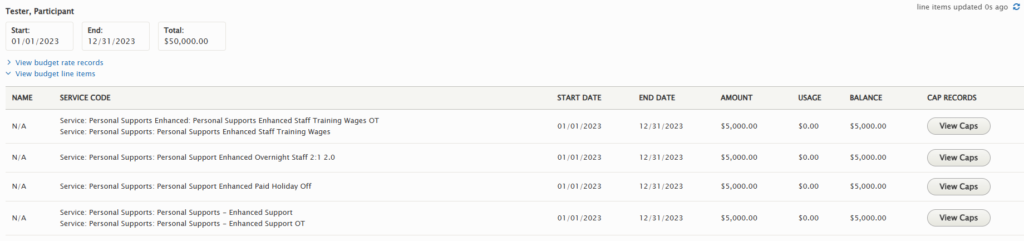
The Budgets tab features all your budgets, broken out by service line item.
It will show you:
- How much money you have used.
- How much money you have left.
- How many units you have used.
- How many units you have left.
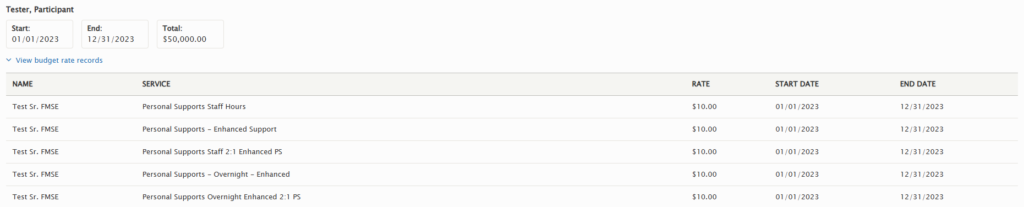
- Employee service codes and the rate for each code.
To see your line items and the money available for each one, click View Budget Line Items.
To see the units for a line item, click the View Caps to the right of the budget line item.
(Note: Cap Records only appear for direct support services, such as wages and vendors. They do not appear for benefits, such as mileage and paid time off.)
View Employee Service Codes/Rate Records
The Budgets tab also shows your employees’ available service codes and their rates for each budget.
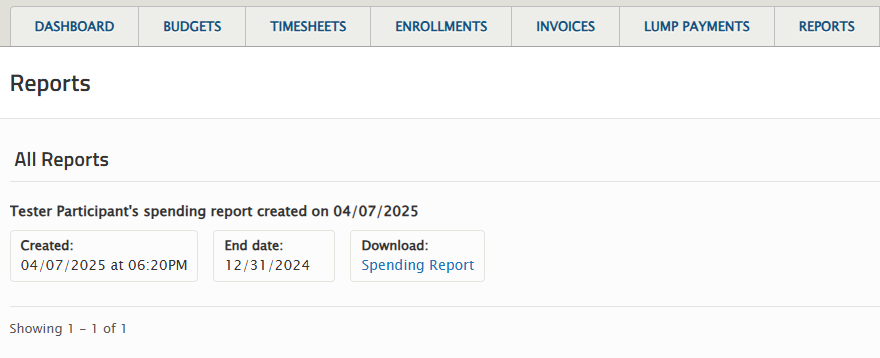
The Reports Tab
The Reports tab features a downloadable Spending Report that includes a list of individual expenses in addition to the remaining budget totals.
These reports are updated every pay period, on the day before the payroll check date.
Questions about Your Budget
If you have any questions about using the Participant Dashboard, you can view additional resources on the Tools & Technology page of our website.
Should you have any individual questions about your budget, please place a customer service ticket under “Financial Reporting.”